Custom sidebar apps let you display dynamic, rich content related to a ticket right in your project's sidebar. You can show text, images, data tables, action buttons, and even interactive forms — all powered by your own API.
Start by navigating to Settings → Project → Sidebar apps. Click "Add app" and configure:
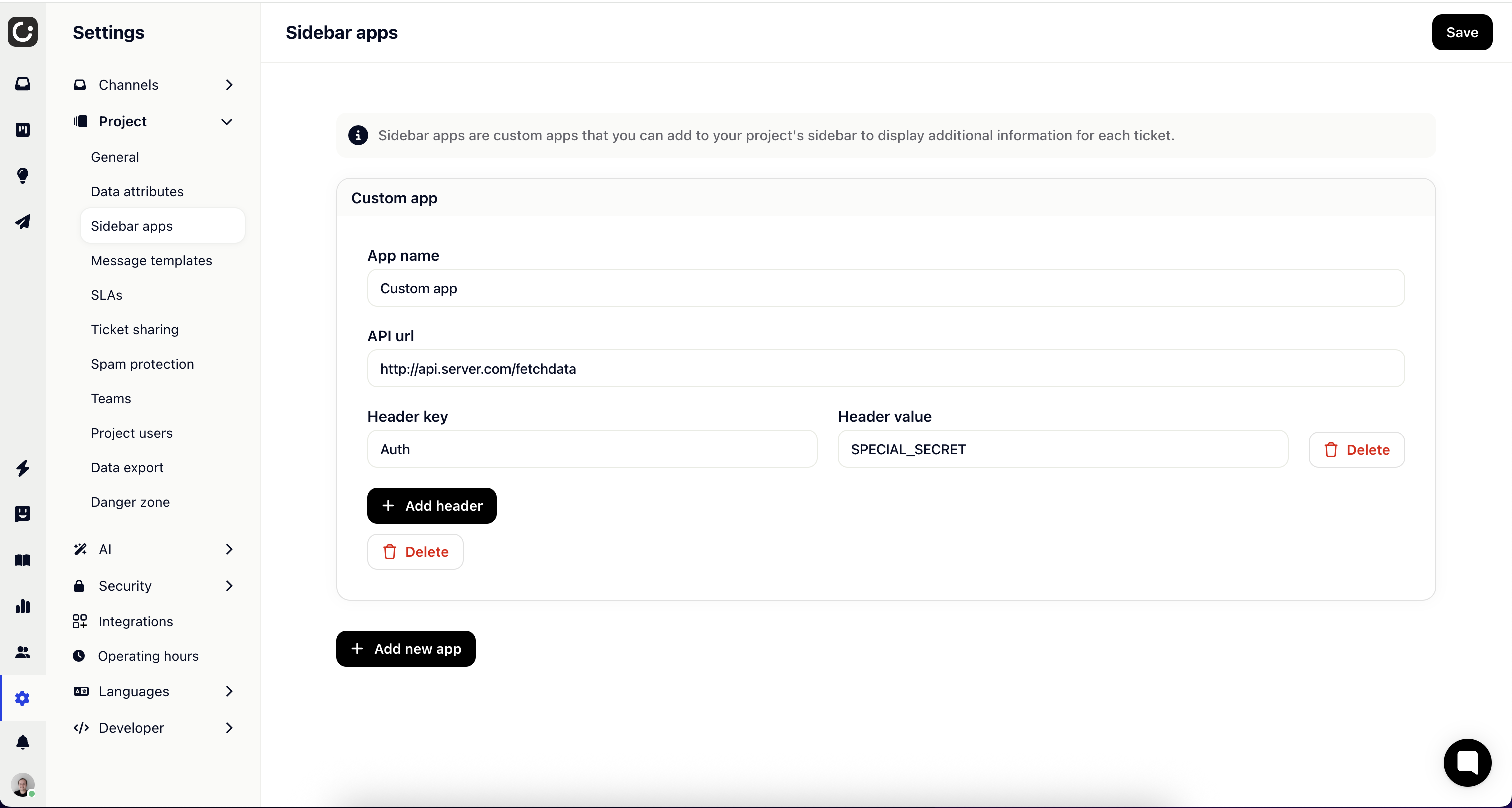
API URL — The endpoint Gleap will call when a ticket is opened.
Name — A display name shown as the sidebar section header.
Headers — Optional key-value pairs sent with every request (useful for authentication).
Exclude messages — Toggle to omit ticket messages from the request payload.
When a ticket is opened, Gleap sends a POST request to your API URL with context about the current ticket, session, and user. Your API responds with a JSON schema describing what to render in the sidebar.
Request payload:
{
  "ticketId": "TICKET_ID_001",
  "session": {
    "_id": "SESSION_ID_001",
    "gleapId": "UUID_001",
    "lang": "en-us",
    "userId": "USER_ID_001",
    "email": "[email protected]",
    "name": "John Doe",
    "createdAt": "2025-02-03T08:01:45.141Z"
  },
  "sessions": [],
  "user": {
    "id": "agent-123",
    "email": "[email protected]",
    "firstName": "Jane",
    "lastName": "Smith",
    "profileImageUrl": "https://..."
  }
}
Your API must accept POST requests and allow cross-origin requests (wildcard CORS).
Your API returns a JSON object with a content array. Each item has a type and the corresponding data. The supported types are:
text — Plain text
image — An image URL
button — A clickable button (open URL or HTTP request)
html — Raw HTML content
key-value — Structured key-value pairs
form — An interactive form with fields and a submit button
Example response:
{
  "content": [
    { "type": "text", "text": "Customer details" },
    {
      "type": "key-value",
      "keyValue": [
        { "key": "Plan", "value": "Enterprise" },
        { "key": "MRR", "value": "$249/mo" }
      ]
    },
    {
      "type": "button",
      "button": {
        "label": "View in CRM",
        "url": "https://crm.example.com/customer/123"
      }
    }
  ]
}Displays plain text.
{ "type": "text", "text": "Hello, world!" }Displays an image from the provided URL.
{ "type": "image", "image": "https://via.placeholder.com/150" }Renders a clickable button. By default, buttons open the URL in a new tab. Set action to "http-request" to perform an API call instead — the button will show a loading spinner and display a success or error toast.
Simple link button:
{
  "type": "button",
  "button": {
    "label": "Open Dashboard",
    "url": "https://example.com/dashboard"
  }
}
HTTP request button:
{
  "type": "button",
  "button": {
    "label": "Escalate Ticket",
    "url": "https://api.example.com/escalate",
    "action": "http-request",
    "method": "POST",
    "headers": [{ "key": "Authorization", "value": "Bearer xyz" }],
    "body": { "priority": "high" },
    "successMessage": "Ticket escalated!",
    "errorMessage": "Failed to escalate"
  }
}
Button properties:
Property | Type | Default | Description |
| string | required | Button text |
| string | required | Target URL |
|
|
| Button behavior |
|
|
| HTTP method (for http-request) |
| array |
| Custom HTTP headers |
| object |
| Static JSON merged into request body |
| boolean |
| Include ticket/session/user data in POST |
| string |
| Toast on success |
| string |
| Toast on error |
Renders raw HTML content.
{ "type": "html", "html": "<strong>Important notice</strong>" }Displays structured key-value pairs, useful for showing metadata.
{
  "type": "key-value",
  "keyValue": [
    { "key": "Name", "value": "John Doe" },
    { "key": "Plan", "value": "Enterprise" },
    { "key": "Status", "value": "Active" }
  ]
}Renders an interactive form with input fields and a submit button. When submitted, the form data is POSTed to the configured URL. The form resets and shows a toast message on success or failure.
This is useful for creating leads, triggering workflows, or collecting data directly from the sidebar without leaving the ticket view.
Example:
{
  "type": "form",
  "form": {
    "fields": [
      {
        "name": "subject",
        "type": "text",
        "label": "Subject",
        "placeholder": "Enter subject...",
        "required": true
      },
      {
        "name": "priority",
        "type": "select",
        "label": "Priority",
        "options": [
          { "label": "Low", "value": "low" },
          { "label": "Medium", "value": "medium" },
          { "label": "High", "value": "high" }
        ],
        "defaultValue": "medium"
      },
      {
        "name": "category",
        "type": "radio",
        "label": "Category",
        "options": [
          { "label": "Bug Report", "value": "bug" },
          { "label": "Feature Request", "value": "feature" }
        ]
      },
      {
        "name": "description",
        "type": "textarea",
        "label": "Description",
        "placeholder": "Describe the issue..."
      },
      {
        "name": "notify",
        "type": "checkbox",
        "label": "Send notification"
      }
    ],
    "submitLabel": "Create Task",
    "url": "https://api.example.com/tasks",
    "headers": [{ "key": "Authorization", "value": "Bearer xyz" }],
    "body": { "source": "gleap-sidebar" },
    "successMessage": "Task created!",
    "errorMessage": "Failed to create task"
  }
}
Supported field types:
Type | Renders | Notes |
| Text input | Single-line text field |
| Text area | Multi-line text field |
| Number input | Numeric values only |
| Date picker | Native date selector |
| Dropdown | Requires options array |
| Radio buttons | Requires options array |
| Checkbox | Value is true/false |
Field properties:
Property | Type | Default | Description |
| string | required | Unique field identifier (key in submitted data) |
| string | required | One of: text, textarea, number, date, select, radio, checkbox |
| string | — | Display label shown above the field |
| string | — | Placeholder text for text, textarea, number |
| boolean |
| Whether the field must be filled before submit |
| string / number / boolean | — | Initial value for the field |
| array | — | Options for select/radio: [{ "label": "...", "value": "..." }] |
Form properties:
Property | Type | Default | Description |
| array | required | Array of field definitions |
| string |
| Text on the submit button |
| string | required | URL to POST form data to |
|
|
| HTTP method |
| array |
| Custom HTTP headers sent with the request |
| object |
| Static JSON merged with form data in request body |
| string |
| Toast message on success |
| string |
| Toast message on failure |
Submission payload:
When a form is submitted, the request body contains the static body values merged with a formData object:
{
  "source": "gleap-sidebar",
  "formData": {
    "subject": "Login issue",
    "priority": "high",
    "category": "bug",
    "description": "User cannot log in after password reset",
    "notify": true
  }
}CORS — Your API must allow cross-origin requests from the Gleap dashboard domain.
Fast responses — Keep your API response time low for a smooth sidebar experience.
Error handling — Always return valid JSON. If something goes wrong, return an empty content array: { "content": [] }
Mix content types — Combine text, key-value pairs, buttons, and forms in a single response to create rich sidebar experiences.
Context-aware — Use the ticket, session, and user data from the request to personalize what you display.