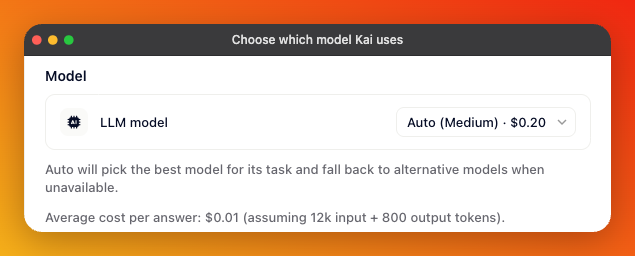
Open AI & Automation, select Kai, and look under Model.
Auto picks a model for the task and falls back to an alternative when one isn't available. That fallback is the practical argument for leaving it alone: a provider outage doesn't stop Kai from answering.
On plans without model selection, this row reads Auto routing and can't be changed. An Unlock link next to it shows what's needed.
Where model selection is available, the row becomes a dropdown. Each entry carries its price per million tokens, input and output, so the list doubles as a cost comparison.
Underneath, two things appear once you select a model: a short description of what it's good for, and an estimated average cost per answer, calculated on a typical exchange of about 12,000 input and 800 output tokens. Use that figure rather than the per-million rates when comparing — it's closer to what a real conversation costs.
Gleap maintains the list and updates it as models are released and retired. If a model you pinned later leaves the list, your choice keeps working and stays visible in the dropdown, so nothing breaks silently and you can move to a current model when you're ready.
How the answer reads — phrasing and how well it holds a longer thread together.
How it handles a question that needs several pieces of your documentation combined.
Cost per answer, which varies widely across the list.
Whether customers can send screenshots. Not every model reads images — if the one you picked can't, the Vision switch under Features is disabled and names it.

Start on Auto and change it only when you have a reason. The two reasons that come up in practice are cost, once you can see what you're spending per answer, and image support, when your customers tend to send screenshots.
If you do change it, read a handful of real conversations afterwards. Model behaviour on your own content is hard to predict from a description, and the difference usually shows in how the model handles questions your documentation only partly covers.