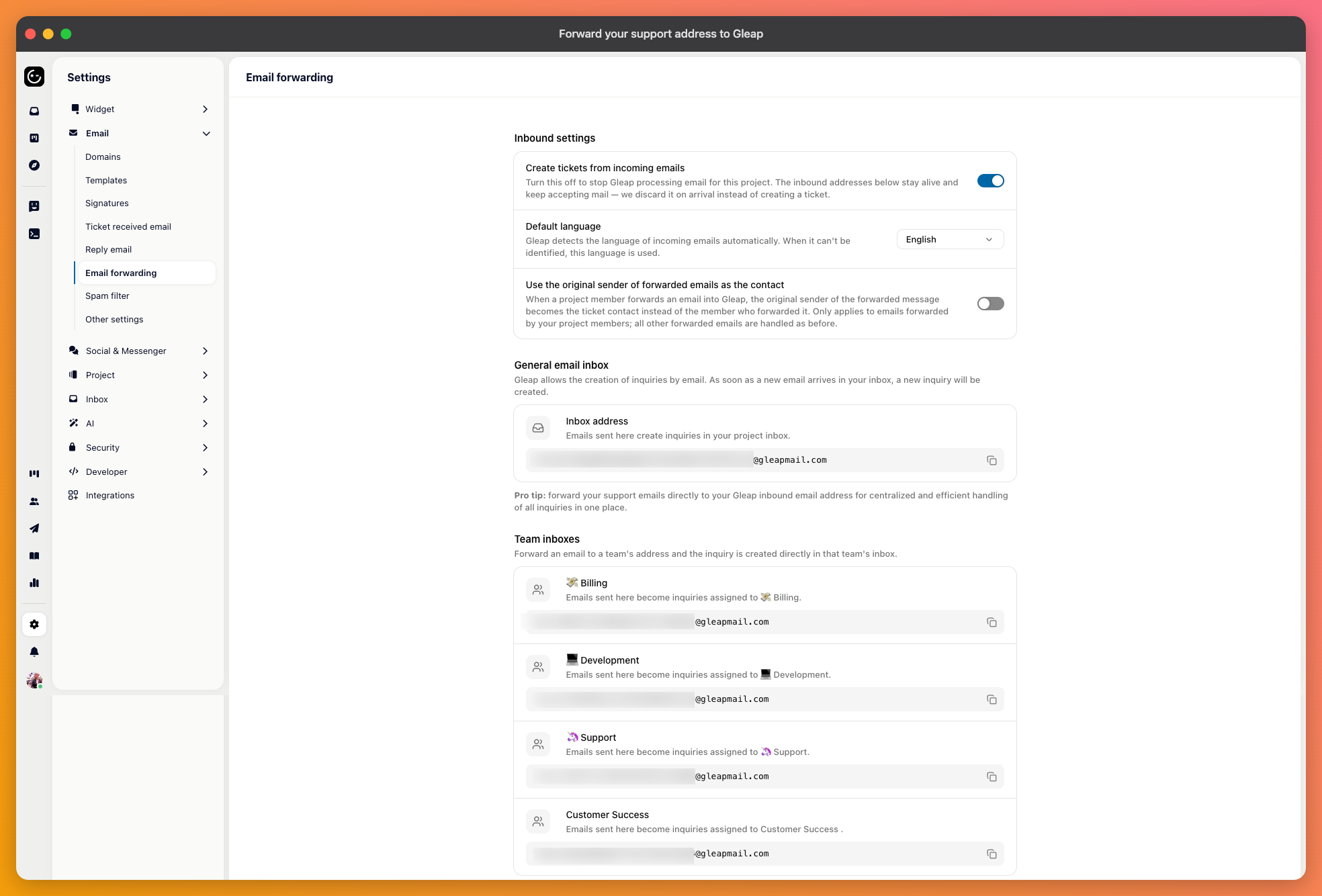
You probably already have an address customers write to. Rather than asking them to change habits, you forward that address into Gleap, and the emails arrive as tickets alongside everything else.
In your project's channel settings, open Email and go to Email forwarding. The page shows the inbound address for your project.
Copy it, then set up forwarding in your own mail provider — Google Workspace, Microsoft 365, or whatever hosts your domain — so everything arriving at your support address is forwarded there. That part happens outside Gleap.
Make sure Create tickets from incoming emails is on, or the mail arrives and nothing happens.
This is the setting that decides whether forwarding is useful: Use the original sender of forwarded emails as the contact.
A forwarded email technically comes from your own forwarding address. Without this on, every ticket is attributed to that address, so your inbox fills with one contact who appears to have written thousands of times, and replies go back to your own mailbox instead of to the customer.

Send an email to your support address from an outside account — a personal address, not a colleague's account on the same domain, since internal mail sometimes takes a different route.
Check three things: the ticket appears, the contact is the person who wrote rather than your forwarding address, and your reply reaches them. The third is the one people forget to test, and it's the one customers notice.
Forwarding covers mail coming in. Replies going out still come from a Gleap address until you verify your own sending domain, which is worth doing at the same time — customers who wrote to your support address expect an answer from it.