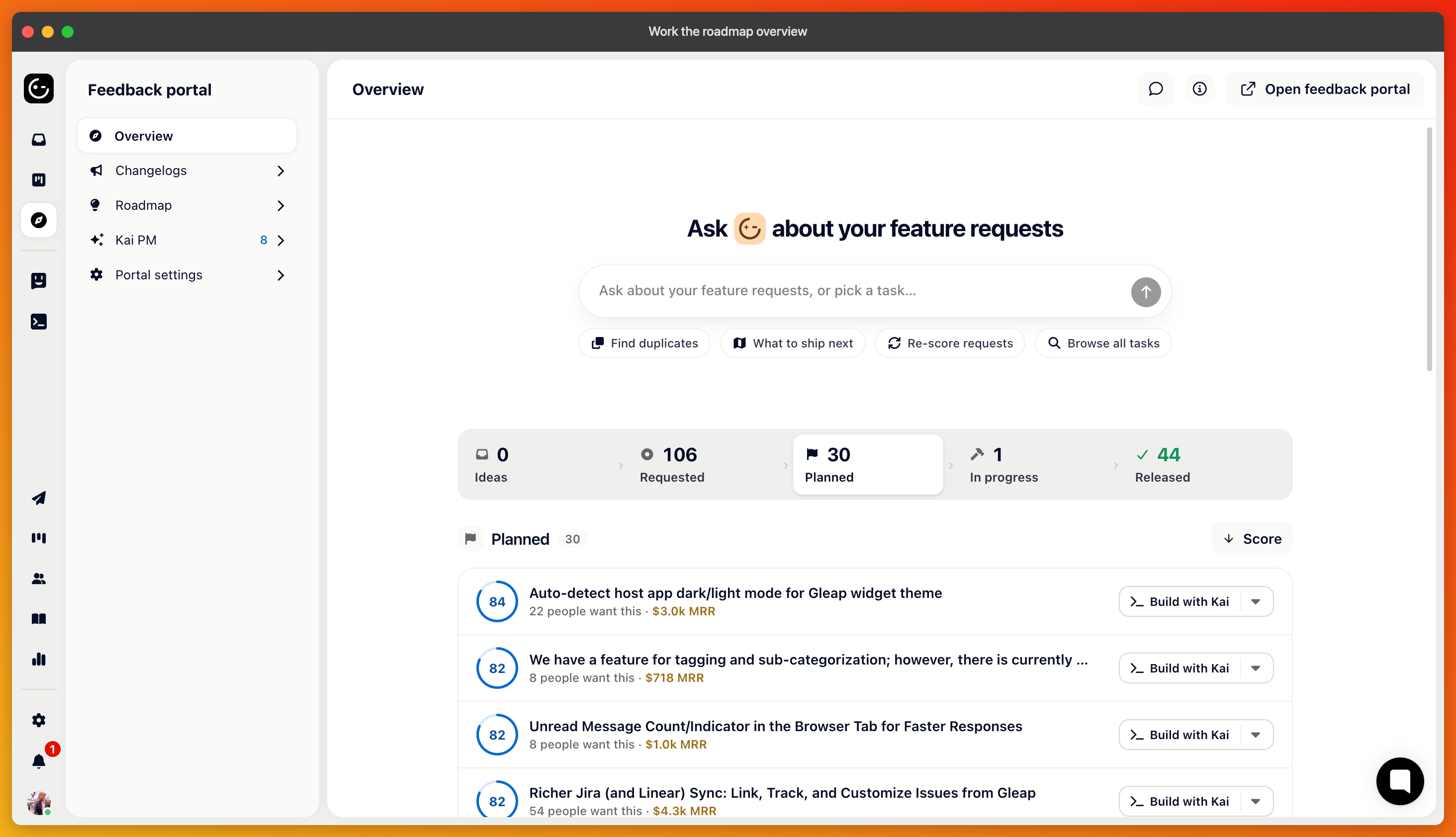
The overview is the first page under the Feedback portal. It shows your feature requests as a pipeline, one stage at a time, with the things that need a person marked in red.
The strip across the top is your roadmap's lanes, in the order you arranged them: Ideas, Requested, Planned, In progress, Released, or whatever yours are called. Hidden lanes don't appear, except the first one, which is your intake. Click a stage or press its number (1 to 9) to open it.
A red count on a stage is attention: requests where nothing will happen until someone acts. On intake, that's a request Kai asked for details on and got no answer for two days. On the building stage, it's a pull request ready for review, or a Kai Code session that failed. The page opens on the first stage with attention, otherwise on Planned.
An amber stage means a bottleneck: Requested has requests, but Planned is empty, or the like.
Each row is one request: the score ring, the title, and "12 people want this · $2,400" from the votes and the revenue behind them. Hover the ring for Why: the strategy and effort meters, votes and revenue, and Kai's reason. Click the row to open the request.
A status pill says where the request is with Kai: "Kai deciding", "Kai asked for details", "No answer for 3d", "Kai accepted 2 days ago", "Kai Code · PR #42 ready", "Released Sep 8".
What you see depends on Let Kai decide.
With it off, this stage is called Needs your review, and each row has Accept and Decline. Both open a composer with your reply template filled in (from Other settings → Voter replies). Send & accept notifies everyone who voted and moves the request to Planned; Only accept moves it quietly. Send & archive, and Ignore & archive do the same for declines.
With it on, Kai handles new requests, and the stage shows what it's doing. Accept and Decline appear only on requests that have waited two days for a customer's answer, so you can decide instead.
Rows on Planned have Build: start a Kai Code session on the request, or hand it to Claude Code, Codex, or Cursor on your own machine. Rows on the building stage show Review PR #n or Open session.
Rows in lanes without a Kai action show the next lane as a button ("In progress →"). Moving a request into your released lane opens the release composer: Send & release tells everyone who voted (the default text says the feature has shipped and thanks them); Release silently just moves it. Closing the loop is the cheapest thing on this page that customers actually notice.
The intake stage has Show declined. It lists archived requests with who declined them and why: "Kai declined · 2h · outside the product's scope" or "Declined by your team". Accept on any of them reverses it and notifies the voters.
The list refreshes when you return to the tab. A "Next stop" link under each stage takes you to the following one, which is the natural way to walk the board on a Monday.