
A welcome series is a short sequence of automated emails that every new subscriber receives — and one of the best ways to turn free readers into paying members. On Steady you can set one up for free: our Email Automation feature comes with three ready-made templates, so you just personalise the placeholders and switch it on.
The most successful welcome emails cover a few essentials. Use this as your checklist:
A warm welcome or thank-you — acknowledge that they just signed up.
What to expect — what you write about and how often.
Your backstory — who you are and why readers can trust you on this topic.
Your best articles — link to two or three popular pieces so readers can dive in straight away.
A clear invitation to become a member — once readers trust you, invite them to support your work.
Optional extras that help a series stand out:
Ask readers to add your sender address to their contacts, so your emails land in the inbox.
Ask why they subscribed — a reply is a strong signal and starts a conversation.
Invite them to follow you elsewhere (social media, your podcast).
Tell them what’s coming in the next email.
Our “User subscribed to newsletter” welcome flow includes 3 pre-written templates, already saved as drafts in your Steady backend. Personalise the placeholders in {curly brackets} and you’re ready to go — no writing from scratch.
Email 1 — Welcome, intro and your best content.
When: immediately after subscribing.
See the ready-made email
Subject: Welcome! Here’s what you can expect
Hi,
Thank you for subscribing to {my/our newsletter}. It’s great to have you on board!
I’m {your name} and I write about {your topic}. You’ll hear from me every {frequency}.
If you’d like to start reading straight away, here are three popular pieces:
{Article title + link}
{Article title + link}
{Article title + link}
I’d also love to stay in touch on social media — follow me on Instagram {link}, X {link}, or my show on Spotify {link}.
Have a question or an idea for a future topic? Just reply to this email.
See you in your inbox soon,
{your name}
Email 2 — More about who you are and what readers can expect.
When: 1–2 days after subscribing.
See the ready-made email
Subject: Why I write this newsletter
Hi,
I’d like to tell you the story of why I started {your publication}.
Share the story of why you started publishing this newsletter.
Curious to read more? Today I’d recommend this piece: {Article title + link}
Until next time,
{your name}
Email 3 — Introduce the benefits of becoming a paying member.
When: anywhere from 7 to 30 days after subscribing (depending on how often you send your newsletter).
See the ready-made email
Subject: There’s more to this newsletter — become a member
Hi,
You’ve been subscribed to my newsletter for {7 days — adjust this number}. Thank you! I hope it’s giving you the inspiration and information you expected. (If not, please help me improve by replying.) Right now you’re a free subscriber. But there’s more.
You can become a paying member of {your publication}. As a member, you can… {make the pitch for why a reader should support you}. To become a member, you just need a free Steady account.
[Button: Become a member]
Not convinced yet?
That’s okay — I’d love to keep you as a free reader.
Until next time,
{your name}
It keeps you out of spam. Emailing new subscribers right away builds your sender reputation, so your newsletters land in the inbox.
It converts free readers into members. A 2022 Piano report found that a significant share of membership revenue is earned in the first 30 days after someone subscribes.
More emails, more revenue. Mailchimp data shows a series drives 51% more revenue than a single welcome email — so don’t be afraid to use all three templates.
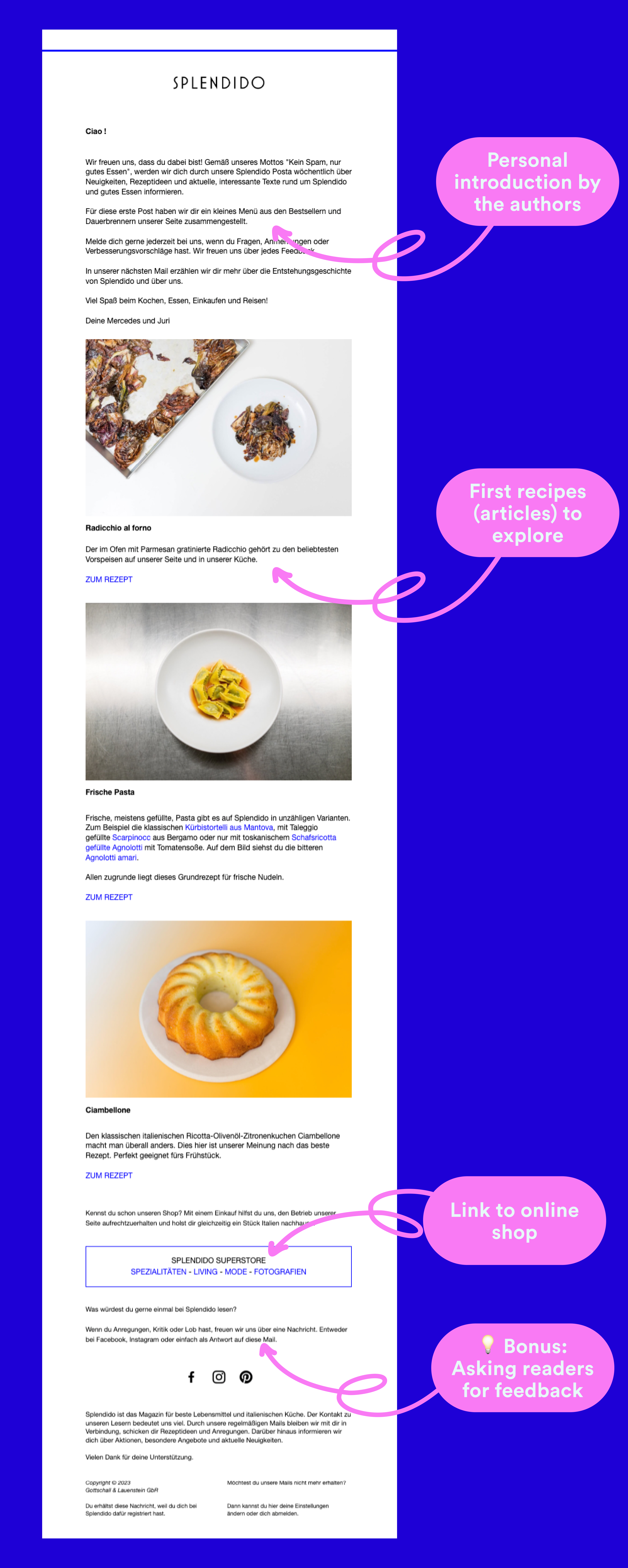
Take a look at these two welcome emails.
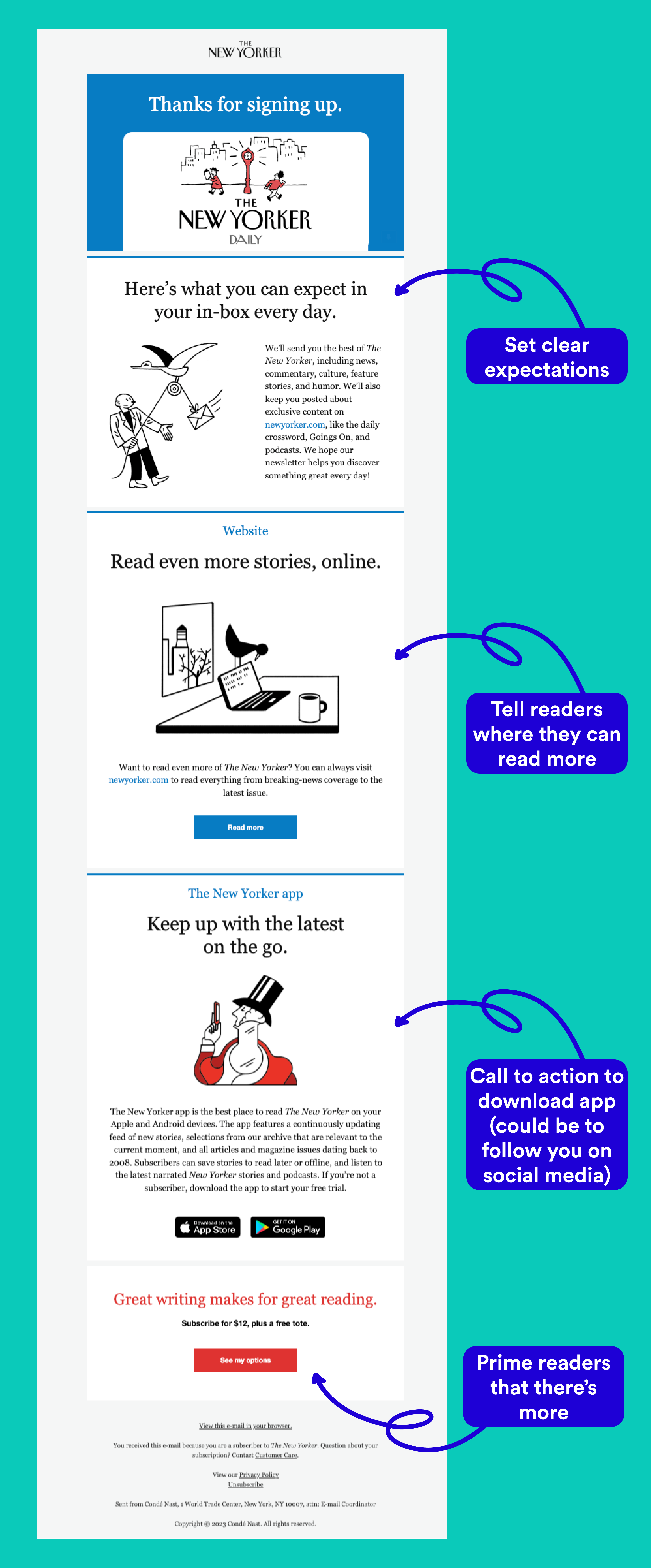
Even with little visual styling, a welcome email can work beautifully.
What’s a good open rate for my welcome emails?
Around 45–60% is a good open rate for independent newsrooms. Some Steady publishers regularly see over 70%. As a rule, the bigger your audience, the lower your open rate. We plan to add benchmark data across Steady projects in the future.
How many welcome emails should I send?
We recommend three — see the 3-email sequence above. If you have more to share, you can always add more.
How do I set up an email automation?
Follow our step-by-step guide to Email Automation.
Read the full guide to setting up Email Automation, or email us at [email protected] — we’re happy to help.

