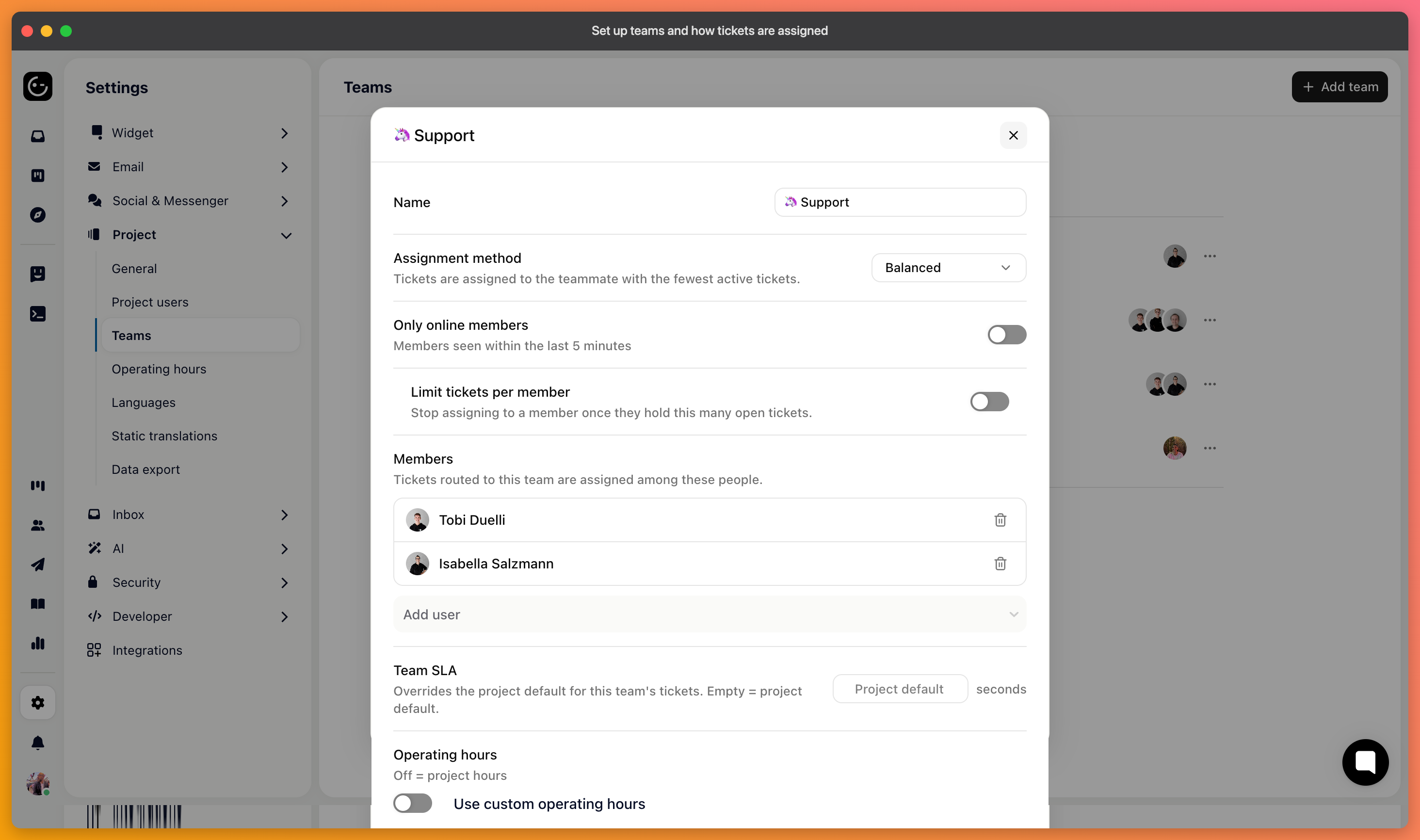
A team is a group of people who handle a particular kind of work — billing, technical support, a language, a region. Once teams exist, conversations can be routed to one instead of landing in a single shared pile.
In your project settings, add a team, name it, and add its members. Someone can belong to several teams, which is normal on a small team where one person covers billing and everything else.
Each team has its own assignment method:
Manual — tickets aren't assigned automatically. People pick up what they take on.
Random — assigned to teammates in a random order.
Circular — assigned in turn, one after another.
Balanced — assigned to whoever currently has the fewest active tickets.
Balanced is the one to reach for in most support teams. Circular distributes evenly by count but ignores that one person may be sitting on five difficult cases; balanced accounts for what people are actually still holding.
Manual works well for small teams where everyone sees everything, and badly as soon as it's ambiguous whose job something is.
A team can be set to assign only to members who are currently online. Without it, automatic assignment cheerfully hands conversations to someone on holiday, and they sit untouched until they come back.
Worth switching on for any team that isn't all in one place at one time.
With circular or balanced assignment, you can also limit how many active tickets a person may hold at once. Beyond the limit, work goes to someone else rather than piling up.
This protects the quality of the answers more than it protects the person. Someone holding twenty open conversations is triaging, not helping.